Changelog

Updated through 2026-10-13. A running record of every NuromBoard iteration across whiteboards, mind maps, material organization, and AI workflows.

Version archive

October 2026

9 updates

Education discounts go live

New feature
  • Added a dedicated education discount area where students and teachers can submit an education status verification request and unlock exclusive pricing once approved.
  • Added an “Education discount” entry to the top navigation, so applying is more direct.
  • The pricing page and purchase dialog now display education discount information too, so eligible users can review their benefits quickly before ordering.
Filter recent files by source

New feature
  • Recent files can now be filtered by source, so you can switch quickly between all files, my files, team files, and “Shared with me”.
  • Refined the empty state layout for recent files, so the guidance on the page is friendlier when there is nothing to show.

Phone number binding, plus better mind map summary nodes

New feature
  • Added phone number binding. You can bind a phone number during sign-up and sign-in and in account settings, making account security and recovery more reliable.
  • Phone number binding is also available inside the board, so account information is more complete when collaborating and sharing.
  • Improved position calculation for mind map summary nodes, so summaries follow node adjustments more accurately.
  • Fixed an issue with text editing on the canvas, making text input and edits more stable.

Paste Markdown into a mind map, and AI sticky notes sign themselves

New feature
  • The whiteboard now accepts pasted Markdown text and converts it into a mind map structure in one step, turning document content into a visual overview quickly.
  • When AI inserts a sticky note, a signature is added automatically, making the source of AI-generated content clearer.
  • Improved the Markdown parsing logic and the default style used when inserting into the canvas, so conversions are more stable and the layout looks better.
  • Fixed layout problems when inserting mind maps, and refined mind map node calculation and container color configuration.

Board mentions with @, and signatures on sticky notes

New feature
  • Added @ mentions on the board. While collaborating you can call out the relevant members right in canvas content, making discussion and assignment more direct.
  • Sticky notes can now enable a signature line, so notes can carry an author name and content ownership is clearer in team collaboration.
  • Files can now be opened directly in preview mode, so you no longer have to enter edit mode first to look at a board someone shared with you.
  • Fixed issues such as mind map nodes not appearing on hover, and incorrect collaboration information in guest mode.

Better avatars for document @ mentions, and profile avatar fixes

Improvement
  • Refined the avatar style for @ mentioned members in the document editor, so members look more consistent and are easier to recognize.
  • Fixed a problem where the avatar was lost after updating personal information; avatars now save and display correctly after profile changes.
  • Improved how the board container title bar, edit box, and toolbar are displayed, making the editing area more stable to work in.
  • Fixed detail issues in list loading, container colors, and collaboration display for guests.

Quick-create entries and smoother expand actions in the sidebar

Improvement
  • The “All projects” and “Tags” header rows now have quick-create entries: hover the header row and click the icon to create a project or tag directly, without expanding the list to look for a create button.
  • Hovering the quick icon for one second shows a tooltip so the entry is easier to understand, and the icon hides again when you move the mouse away, keeping the sidebar visually clean.
  • Refined the position and animation of the expand and collapse arrows for “All projects” and “Tags”, so each section's state is clear at a glance.
  • Fixed an extra background that appeared when hovering the project list expand arrow in dark mode, making hover feedback cleaner on the dark interface.

Document mentions, with better permissions and purchase experience

New feature
  • Document editing now supports @ mentions, so you can call out colleagues directly in a shared document to add content and follow up on action items.
  • Added a no-permission notice page that explains why access was denied and lets you request permissions right away.
  • Added a dedicated membership purchase page that focuses on plan benefits and the payment path, making the decision to order easier.
  • Added QR code follow and social media entries to the website, and improved the About us page, so product news is easier to follow.

Upgraded mind map relationship lines and summaries, dates on sticky notes

New feature
  • Upgraded the relationship line editing experience in mind maps. Adding, editing, and restyling relation lines is more intuitive, so node relationships are expressed more clearly.
  • Summary nodes now support hover highlighting and selection, and summary borders, style settings, and display in view mode are more consistent.
  • Sticky notes can now display a date, making it clearer to record to-dos and ideas with time context.
  • Fixed issues with mind map dragging, closing the version history sidebar, and context menus, making canvas operations more stable.
Version archive

September 2026

8 updates

Column layouts launch, plus template filtering and performance work

Improvement
  • Documents now include a column content block with side-by-side columns and adjustable border styles, making page layout more flexible.
  • The whiteboard template center can now be filtered by type, and recommended templates help you find a suitable structure faster.
  • Shape recognition now supports more element types, and inserting sequence diagrams was improved at the same time, so sketches convert to formal shapes more accurately.
  • Improved export stability, home page loading performance, and how SEO information is presented, so files export reliably and pages open faster.

Document templates launch for a faster start

New feature
  • Added document templates. When you create a document you can start from a preset structure instead of laying it out from scratch.
  • Templates support cover images and recommended placement, making it easier to pick one for your scenario.
  • Template submission now has designer permission controls, so template quality is better protected.
  • Refined the document type entry point, document naming, and creation logic, so the path to a new document is clearer.

Dark mode across the whole site

Improvement
  • Dark mode now covers the home page, document editor, and common dialogs, and your light or dark preference is saved automatically.
  • Images, icons, skeleton screens, and scrollbars adjust with the theme, giving dark mode a more consistent look.
  • Code blocks, floating toolbars, and the left toolbar were tuned for dark themes, making night-time writing more comfortable.
  • Fixed inconsistent display of some icons and borders in dark mode.

Document comments launch for in-place discussion

New feature
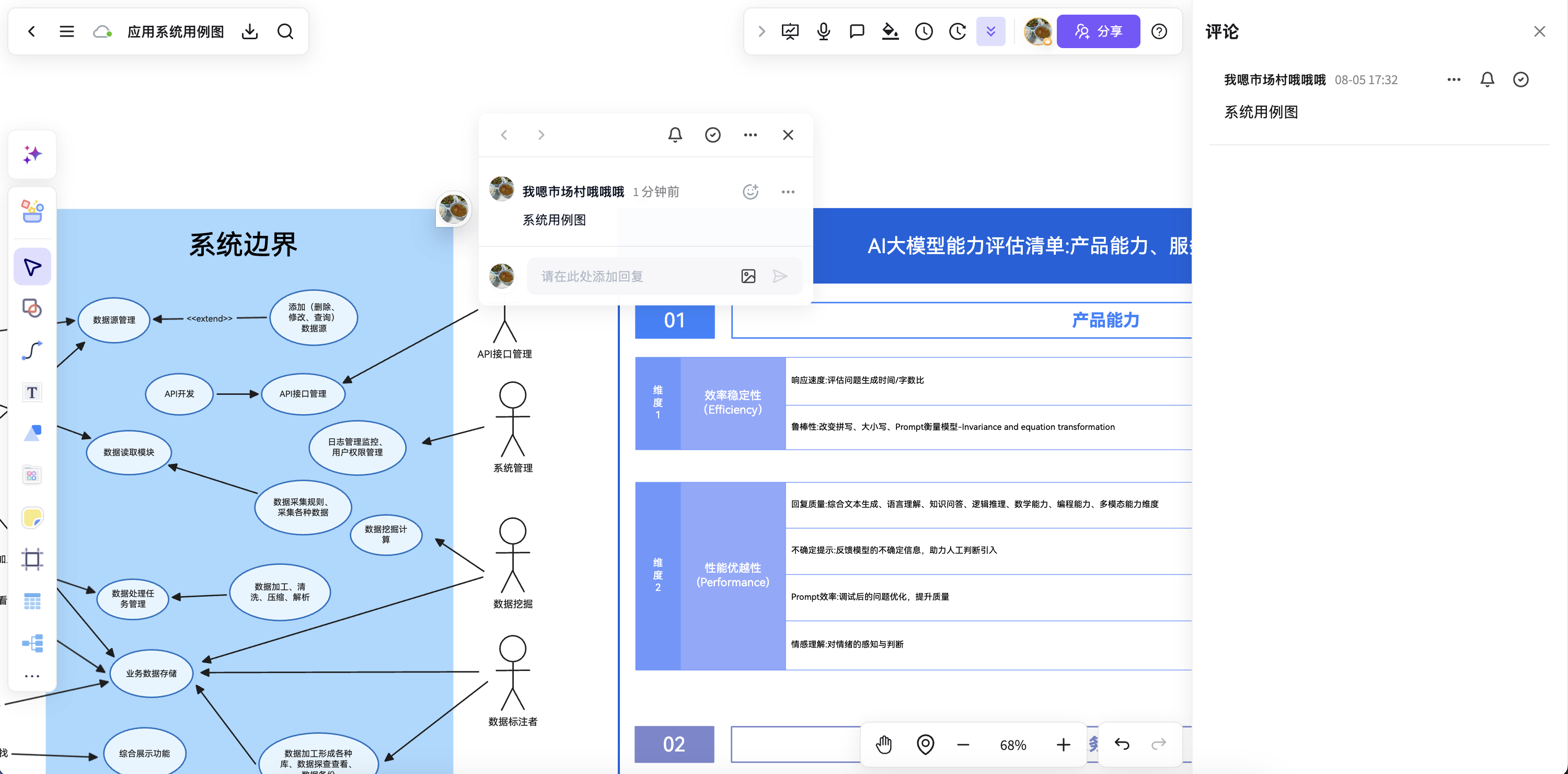
  • Documents now support comments on body content, with every discussion collected in a comment list so it is easy to follow up item by item.
  • Improved comment styling and list interactions, so switching between reading the text and reviewing discussion feels smoother.
  • Comments are linked to their position in the document, so the context behind each discussion is clear at a glance.
  • Together with the existing text-selection comments on whiteboards, team discussion in documents and on canvases now forms a more complete collaboration loop.

Real-time co-editing and sharing for documents

New feature
  • The document editor supports real-time collaboration: content, cursors, and save status sync instantly between collaborators.
  • Added document sharing, so you can invite members to view and edit together through the share entry.
  • Improved panel opening and loading skeletons in collaboration scenarios, so status feedback is clearer when several people edit at the same time.
  • Fixed problems with sharing and cover image display, so shared documents present their content more completely.

More document blocks: code, formulas, and beyond

New feature
  • Added code blocks with automatic language detection, syntax coloring, and whole-block dragging, making technical notes easier to write.
  • Supports formulas, dividers, highlight blocks, and collapsing or expanding headings, so long documents are organized more clearly.
  • Improved rendering of CJK emoji and date formats, and added edits such as deleting the first line, so typing feels more natural.
  • Improved the editor scrollbar, tool panels, and autosave logic, so writing long passages is smoother.

Insert whiteboards into documents, and tables arrive

New feature
  • The document editor can now embed a whiteboard directly in the body. The embedded board can be previewed and edited inside the document, so you no longer switch back and forth between document and canvas while gathering material.
  • Added a table block with cell selection and editing, row and column adjustments, and floating tools, making structured information easier to record.
  • You can now add a cover image to a document, so document cards, previews, and shared views present more complete information.
  • Improved rendering of boards inside documents, drag display, and editor panels, making long documents that mix text and images more stable to edit.

Document editor launches with a new document type

New feature
  • The workspace now has a document type: create a document just like a whiteboard, then write in a dedicated document editor.
  • Supports headings, paragraphs, lists, quotes, code blocks, tables, and collapsible content, covering proposals, notes, and meeting minutes.
  • Content block dragging, a quick toolbar, and AI-assisted editing make long documents faster to write, adjust, and organize.
  • Text selection comments, replies, and comment resolution let teams discuss specific content and keep collaborating in place.
Version archive

August 2026

6 updates

Upgraded mind map border settings on the board

New feature
  • Added upgraded border settings for mind maps: adjusting node border styles is more intuitive, and the result on the canvas is clearer.
  • Border settings now connect more smoothly with existing mind map styling, reducing back-and-forth when adjusting node appearance.
  • Supports more flexible unification of node hierarchy and structure, making key points and content groups easier to tell apart.
  • Helps mind maps express structure, emphasize levels, and present output with fuller styling.

Preset kanban templates on the board

New feature
  • Added preset kanban template logic, so once you enter a board you can apply a common kanban structure and start organizing tasks sooner.
  • The presets cover the most frequent kanban scenarios, cutting the time spent building a basic frame from a blank canvas by hand.
  • Template layouts and section organization are clearer, making it easy to keep adding cards and status flow for your actual project.
  • Helps teams reach an editable state faster when planning tasks, tracking progress, and sorting out collaboration.

Improved mind map color logic on the board

Improvement
  • Improved how colors are applied to mind map nodes and branches, so the result after switching colors is more consistent and predictable.
  • Adjusted how grouped colors appear on nodes at different levels, reducing local color mismatches and muddled hierarchy.
  • Color changes now give more direct feedback, helping you unify the theme style faster while organizing structure.
  • Makes switching between expanding content, adjusting styles, and refining visuals smoother in mind maps.

Recent file previews on the board

New feature
  • The recent files list now supports direct previews, so you can confirm the file you want without opening each one.
  • Previews cover more of the common board content scenarios, helping you get back to a file you just edited faster.
  • Cuts the repeated entering and going back in the file list, so picking up work feels more continuous.
  • Well suited to switching between many boards, improving everyday browsing and backtracking efficiency.

The eyedropper tool arrives

New feature
  • Added an eyedropper tool that picks colors directly from shapes, images, and backgrounds on the canvas.
  • Sample colors quickly for strokes, fills, text, text backgrounds, arrows, and mind map branches.
  • Canvas theme colors also support eyedropper sampling: pick a color and apply it to the current setting right away.
  • Reduces typing hex values by hand and comparing colors over and over, making color adjustments more intuitive and efficient.

Mermaid to diagram launches

New feature
  • Added Mermaid to diagram, which converts Mermaid syntax directly into canvas diagrams you can keep editing.
  • Supports common structures such as flowcharts, sequence diagrams, class diagrams, and ER diagrams, reducing the cost of moving from a text description to an organized visual.
  • Preview inside the editor before inserting into the canvas, so generating, checking, and adjusting a diagram flows better.
  • Helps technical plans, business processes, and system relationships land on the whiteboard faster, ready for further edits and collaboration.
Version archive

July 2026

3 updates

Hand-drawn shape recognition launches

New feature
  • Added a shape recognition tool that automatically turns hand-drawn strokes into cleaner basic shapes.
  • Supports continuous drawing and recognition, reducing switching between rough sketches and formal shapes.
  • Improved preview feedback and generation timing during recognition, so drawing feels closer to natural handwriting.
  • Great for process mapping, structure drafts, and quick co-creation, helping ideas reach the canvas faster.

Comments launch for smoother collaborative discussion

New feature
  • The whiteboard now supports adding comment anchors directly on the canvas, making it more intuitive to start a discussion around a specific spot.
  • View the comment list, reply to comments, and edit or delete your own comments, for a more complete discussion trail.
  • Added read and unread states for comments, canvas anchor previews, and side panel linkage, making collaboration clearer.
  • Insert images and @ mention team members in comments to add context and assign collaboration inside the whiteboard.
Comments launch for smoother collaborative discussion

Tape elements on the canvas

New feature
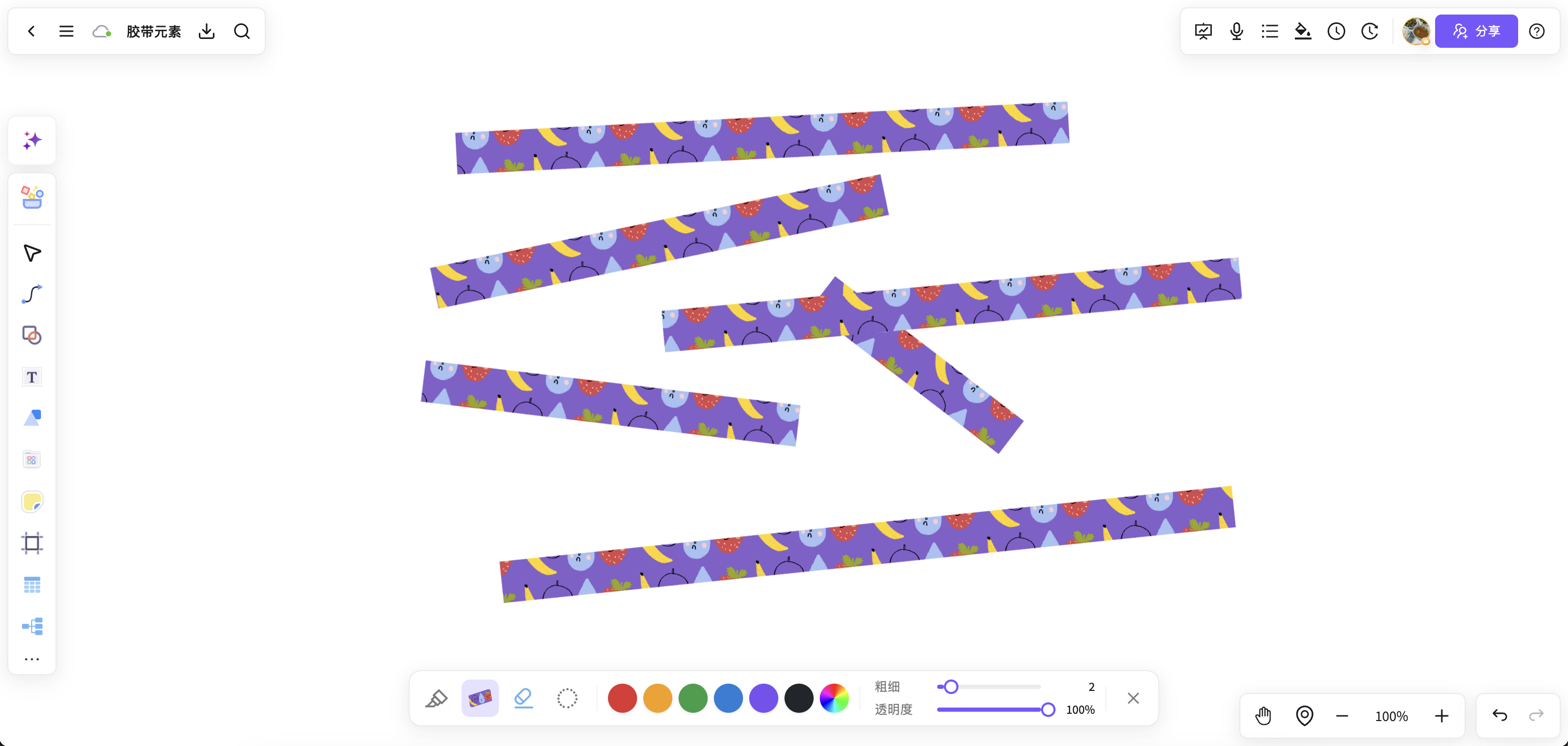
  • You can now add tape elements straight to the canvas to pin sticky notes, images, and ideas in place, making the board more expressive.
  • Adjust tape color and style for a natural journal, collage, or presentation feel.
  • Great for note organization, proposal presentation, mood boards, and visual co-creation, giving the canvas more depth and detail.
Tape elements on the canvas
Version archive

June 2026

1 updates

Mind map nodes accept more content types

New feature
  • Mind map nodes can now hold sticky notes, videos, comments, and attachments
  • The insert entry and content organization are clearer, so nodes carry more complete information
  • Fits common editing flows and reduces switching between nodes and external material
Version archive

May 2026

5 updates

Color palettes for mind map elements

New feature
  • Mind map elements support color palettes, so grouped colors can be applied to nodes and branches in one step
  • Several color schemes are available to unify the theme style quickly
  • Saves the time it takes to adjust colors one by one by hand

Better output from the AI agent

Improvement
  • The AI agent can now generate mind maps, flowcharts, tables, and document content more smoothly
  • Improved the default layout when inserting results into the whiteboard, cutting the time spent tidying up after generation
  • Refined follow-up questions and regenerate hints for more natural iteration
  • Adjusted capability descriptions and entry copy so first-time use is easier to understand

What's new dialog and workspace onboarding

New feature
  • Added a what's new dialog after entering the workspace to help users understand the latest capability changes quickly
  • Read state is tracked per version, so the same version does not interrupt you twice
  • Added a what's new entry point and linked navigation, making update information easier to find
  • Refined onboarding levels to avoid showing at the same time as the home page persona dialog

Smoother sidebar and project switching

Improvement
  • Adjusted the sidebar collapse button style and icon for a more consistent look
  • Improved state feedback when switching projects and folders, so it is clearer which content you are in
  • Improved the continuity of collapsing and expanding the sidebar on desktop
  • Fine-tuned icon colors and button hierarchy to reduce interface noise

Continued polish of workspace interactions

Improvement
  • Refined the hierarchy of the workspace header and common action entries
  • Adjusted the visual density of dialogs, buttons, and helper copy for easier reading
  • Improved hover and click feedback in places, so results are clearer
  • Improved workspace page stability at common screen resolutions
Version archive

April 2026

5 updates

Project file navigation completed

New feature
  • The file editor page now shows the file structure of the current project
  • Switch to other files in the same project while editing, with fewer jumps back and forth
  • Makes “keep editing within the project context” smoother
  • Improved related navigation hints and state display, so it is easier to understand at first

Template and preview flow refinements

Improvement
  • Reordered the information on template cards so it is easier to judge at a glance
  • Completed the instructions and status feedback in the preview dialog
  • Reduced friction between browsing templates and entering the workspace
  • Improved the stability of loading template covers and descriptions

Dialog and state restoration fixes

Fix
  • Fixed dialogs that did not reset their state in time after a route change
  • Improved how read state, local preferences, and interface state are restored
  • Reduced repeated prompts when first entering the workspace
  • Made interaction state more predictable after a refresh

Better hand-off between the website and the workspace

Improvement
  • Adjusted the entry structure of the website home page and download page, so core paths are more focused
  • Simplified some brand copy and secondary entries to reduce first-screen clutter
  • Improved the transition when entering the workspace from the website
  • Added navigation between the changelog and the help center

Upgraded changelog page and version information

New feature
  • Added a fuller version timeline, so you can review recent iterations by date
  • Strengthened the link between version numbers, update dates, and change types
  • Makes it easier for users to understand what the product has been shipping over recent weeks
  • Completed the changelog page copy and reading hierarchy
Version archive

March 2026

3 updates

A stronger PDF reading and organizing flow

New feature
  • Improved the stability of PDF import and display, so large files open more smoothly
  • Annotated content now moves more naturally into whiteboard organization and structure building
  • Added the missing PDF page copy and help information to lower the learning curve
  • Reinforced the core “read → organize → present” workflow guidance

Membership purchase page and benefits display

Improvement
  • Rewrote the benefit information in the membership dialog so it is more focused and easier to understand
  • Improved the selected state and price display on plan cards, reducing decision effort
  • Adjusted the pay button and status feedback for a clearer payment flow
  • Added the membership agreement entry and details, making the purchase process more complete

Template center and preview experience upgrades

New feature
  • The template center now supports finer category browsing and keyword search
  • Added a template preview dialog and a detail page entry, so you can see a template before choosing it
  • Improved the information hierarchy on template cards, so it is easy to judge whether one can be used as is
  • Made the display logic for member templates and general templates clearer
Version archive

February 2026

4 updates

Recently used and favorites launch

New feature
  • Added a recently used page, making it easier to revisit recent material and boards
  • Added a favorites page, so frequently used templates and content can be managed in one place
  • Completed list empty states and loading states for a more stable browsing experience
  • Makes “open it and keep working” smoother

Account and sign-in experience improvements

Fix
  • Improved phone number sign-in and auth state restoration, reducing repeated logins
  • Improved the user avatar, default avatar, and personal settings dialog experience
  • Fixed display that fell out of sync after a sign-in state change on some pages
  • Improved error message copy and interaction feedback

Help center and website content completed

Improvement
  • Launched content pages including the help center, contact us, and about us
  • Added product positioning, usage instructions, and FAQ introductions
  • Improved the navigation structure, so you can jump from the website to key pages quickly
  • Completed baseline SEO information for clearer search result display

A new home page and product story

New feature
  • Rebuilt the home page around the idea of an “team whiteboard”
  • Added scenario entries, quick start, and showcases of core capabilities
  • Strengthened how whiteboards, mind maps, PDF annotation, and templates relate to one another
  • Unified the website visuals and core copy for more complete brand recognition
Version archive

January 2026

5 updates

Continued export and sharing polish

Improvement
  • Improved the PNG / PDF export flow with a more direct path
  • Added membership notes for watermark-free and high-resolution export
  • Adjusted sharing hints and status copy to reduce misunderstandings
  • Added clearer feedback information when an export fails

Editing area and sidebar interaction

Improvement
  • Improved the sidebar entry structure so common actions are easier to find
  • Adjusted how the example sidebar and recent content are displayed for a clearer hierarchy
  • Improved the search box and filtering interactions, so templates are found faster
  • Improved continuity of operations on desktop and mobile

Template preview and usage flow launch

New feature
  • Added a template preview page to view template details and recommended content
  • Go straight from the preview page into the usage flow, with fewer jumps
  • Added related template recommendations for faster template discovery
  • More complete template cover and description information

Download, feedback, and information pages

Improvement
  • Launched the download page to unify the desktop download entry and installation instructions
  • Completed the feedback form fields for a clearer issue submission path
  • Added links between the changelog, help center, and contact information
  • Improved static content page styling for a more stable reading experience

Brand content and site fundamentals

Improvement
  • Unified the NuromBoard brand name, titles, and page description copy
  • Improved site metadata, icons, and baseline asset references
  • Adjusted public page layout details for a more consistent overall experience
  • Improved baseline first-screen loading experience and stability
Version archive

December 2025

4 updates

Whiteboard, mind map, and material entries unified

New feature
  • Unified the entries for whiteboards, mind maps, and material organization
  • Improved navigation between the home page category pages and the feature pages
  • Strengthened the path design from browsing content to starting to create
  • Made the purpose of each entry clearer

Bug fixes and list experience improvements

Fix
  • Fixed inconsistent display on some list pages when there is no data
  • Improved state switching on pages such as favorites and trash
  • Fixed rare cases of abnormal route back navigation
  • Improved detail stability when switching pages

Better browsing of assets and content

New feature
  • Improved how content is organized on the asset pages and category pages
  • Adjusted card information density for quicker scanning while browsing
  • Improved consistency between recommended content and category content
  • Completed loading states and no-results hints

Home page onboarding and personalized modules

New feature
  • Added a home page persona onboarding dialog to help users understand the product quickly
  • Launched the quick start card area, grouping common creation entries
  • Improved the home page header and footer information structure for a fuller brand story
  • Strengthened path guidance for first-time visitors
Version archive

November 2025

4 updates

Ongoing whiteboard editing improvements

Improvement
  • Improved how common canvas entries and tools are organized
  • Adjusted the surrounding editor UI to reduce non-essential information
  • Improved default feedback for common actions, for a smoother rhythm
  • Improved baseline interaction stability with complex content

Stronger AI generation

New feature
  • The AI generation entry now supports a richer set of output types
  • Strengthened the generation guidance for mind maps, flowcharts, and structured content
  • Improved the hierarchy and guidance copy in the AI results area
  • Lowered the barrier to trying AI features for the first time

Account system and navigation polish

Improvement
  • Improved discoverability of the top navigation and the user menu
  • Improved the signed-in entry state and signed-out hint logic
  • Adjusted transitions on public pages for a more natural way back
  • Improved consistency of shared components across pages

A full user experience upgrade

New feature
  • Redesigned the user menu with Popover interactions for smoother operation
  • Added a changelog page to keep up with the latest product news
  • Improved the membership benefits display, with one-click upgrade for non-members
  • Completed the page navigation structure with quick links to the help center and the website